PDF editor for Windows

Edit, fill in and sign your PDFs. Actually free.

An app for your computer with no account, no ads, no watermarks and no paying to save. Your documents stay with you: nothing gets uploaded anywhere.

  • Windows 10 and 11
  • No sign-up
  • Open source
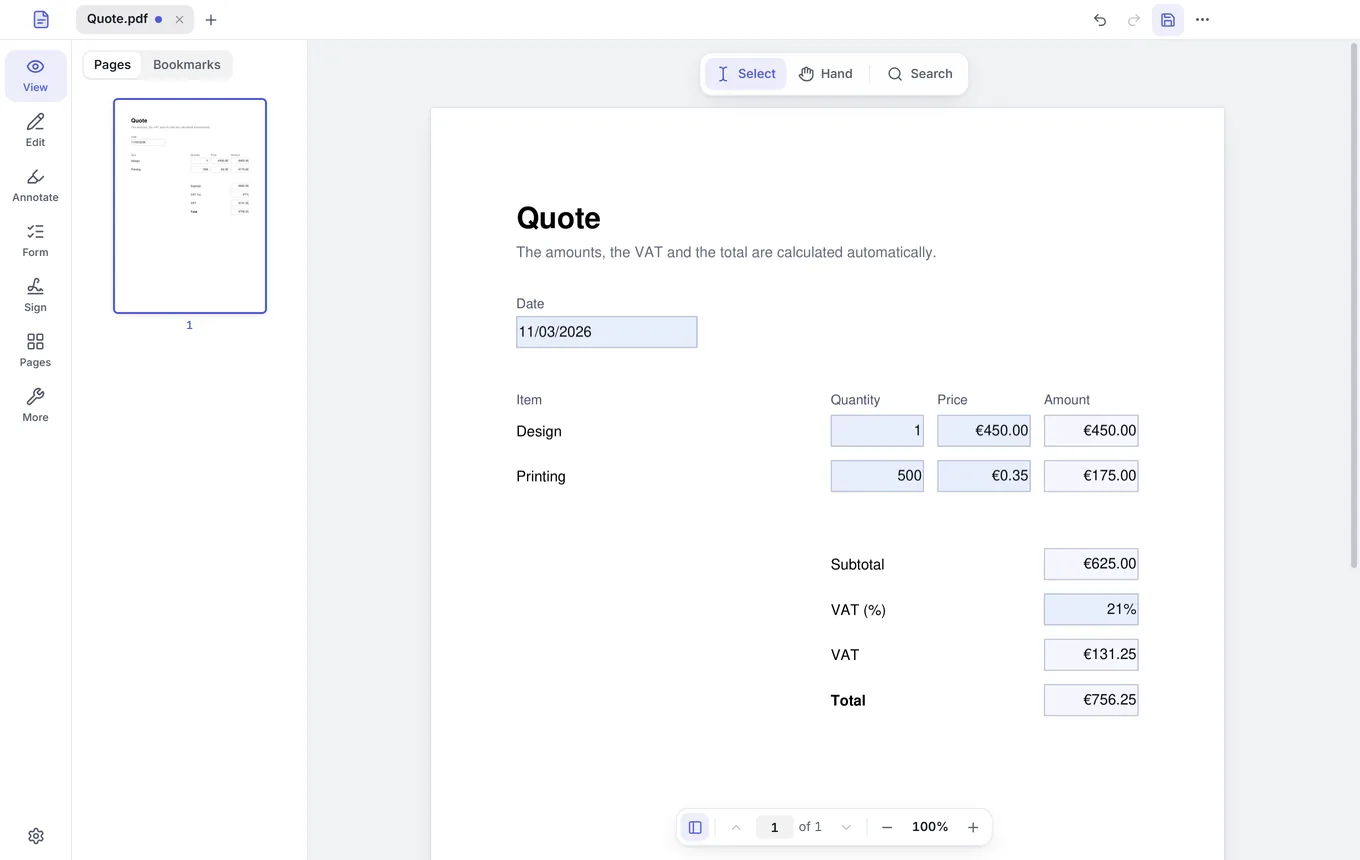
Folio with a PDF quote open: the amounts, VAT and total are calculated automatically

For the paperwork of everyday life

  • Invoices
  • Contracts
  • Payslips
  • Applications
  • Quotes
  • Consent forms
  • Receipts
  • Résumés
  • Exams
  • Leases

Features

Everything you do with a PDF, in one app

Stop jumping between websites and free trials. Folio puts it all together and runs on your computer, even offline.

01Forms

Forms that do the math for you

Type in the fields and Folio adds up the amounts, applies the tax and works out the total on the spot. No fields in the PDF? Type on top of it, wherever you like.

  • Text fields, checkboxes and drop-down lists
  • Type on any PDF, even one without fields
  • Calculates without running the PDF’s code, which is safer

Quote

Try changing the quantities

ItemQuantityPriceAmount
Design €450.00 €450.00
Printing €0.35 €175.00
Subtotal€625.00
VAT (21%)€131.25
Total€756.25

02Signing

Sign by hand or with your digital certificate

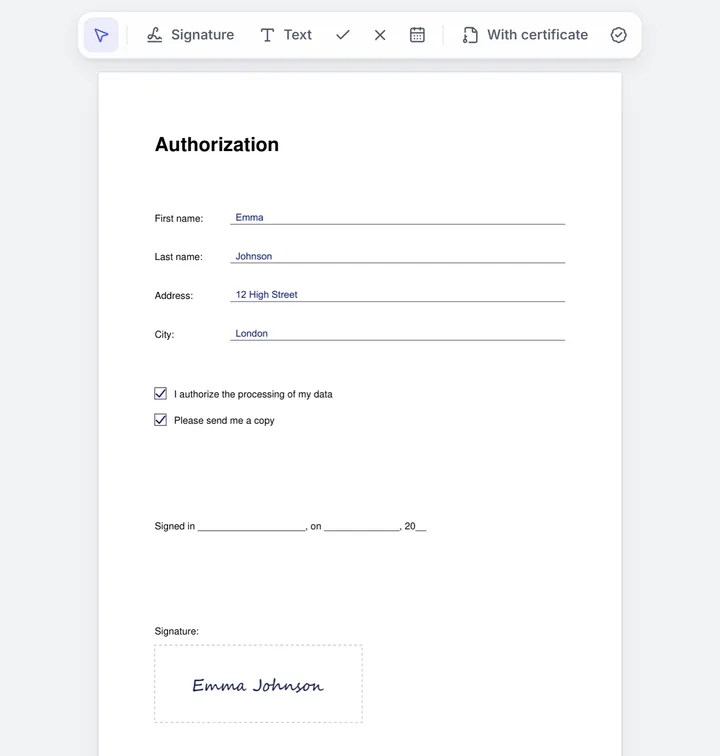
Draw your signature, type it or use a photo of it. For official paperwork, sign with the certificate you already have in Windows, such as Spain’s FNMT, without installing anything else.

  • Electronic signatures in the European standard for PDF (PAdES)
  • Timestamp included, nothing to set up
  • Lock the document when you sign, if you want
An authorization form filled in and signed by hand in Folio, with the signing bar at the top

03Printing

Print your way, and see the result first

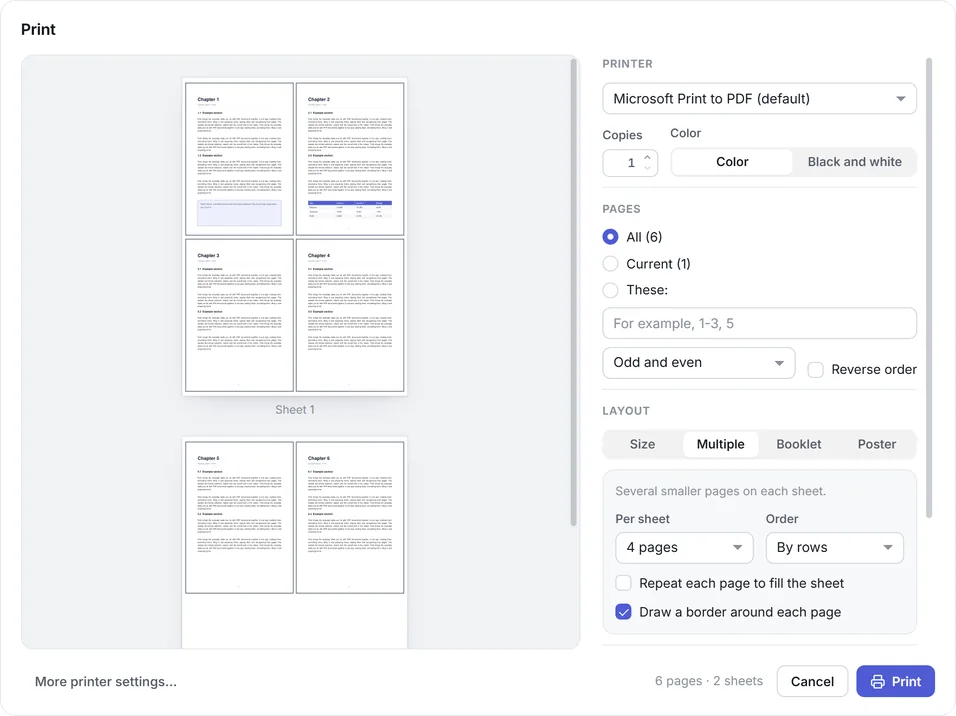
Several pages per sheet, booklets ready to fold and posters across several sheets, with a preview that updates as you go.

  • 2, 4, 6, 9 or 16 pages per sheet
  • Double-sided booklets, in the right order
  • Posters enlarged across several sheets
Folio’s print dialog with a preview of four pages per sheet

And more

The tools you always end up needing

  • Change the text

    Edit the PDF’s own text and add text, images and shapes.

  • Annotate and highlight

    Highlight, underline, strike out, add notes or draw freehand.

  • Merge, split and reorder

    Combine several PDFs, pull out pages, rotate them or change their order.

  • Scan paper documents

    With phone photos or your scanner: it straightens the page and makes it look scanned.

  • Recognize text

    Turn a scan into a PDF you can search and copy from.

  • Make it smaller

    Compress your PDFs so they’re easy to send by email.

  • Convert

    From PDF to Word or images, and from photos to PDF.

  • Password-protect

    Encrypt your PDFs so only people with the password can open them.

  • Remove hidden data

    Strip metadata and photo locations before you share.

04Redaction

Black out personal data. And really delete it.

A black box on top isn’t enough: the text is still underneath and can be copied. Folio removes it from the file when you save.

Optional

And if you want, AI that never leaves your computer

Summarize a document or ask it anything: it answers with the page where each detail is. It’s off by default, and your documents aren’t uploaded anywhere.

Meet Folio’s AI

Privacy

Your documents stay on your computer

Payslips, contracts, a scan of your passport… Whatever you open with Folio never gets uploaded to a server. It doesn’t even ask you for an account.

  • Nothing uploaded

    Everything happens on your computer, even offline.

  • Every PDF in a sandbox

    Each PDF opens in a Windows sandbox: a booby-trapped file can’t reach your other files or the internet.

  • No tracking, code in the open

    Folio doesn’t keep track of what you do, and anyone can review its code.

Read the privacy policy

Folio you view and edit Sandbox your PDF Your files out of reach Internet no connection
The PDF opens in a sandbox: Folio shows it to you, but a booby-trapped file can’t reach your files or the internet.

Why Folio

The best of each option, without the downsides

PDF websites are convenient, but your documents usually pass through their servers. Paid apps do the job, but you have to pay for them.

FolioPDF websitesPaid apps
PriceFree, no limitsFree with limits or adsSubscription or license
WatermarksNeverSometimesNo
Your documentsStay on your computerUsually uploaded to their serversOn your computer
AccountNot neededOftenAlmost always
Digital certificate signingYes, with a timestampRarelyYes
Works offlineYesNoYes

No small print

Free? So what’s the catch?

There isn’t one. Folio is free software: its code is public, and anyone can use it, review it and share it. There’s no paid version, no ads, and it doesn’t make money from your data.

If you find it useful, the best way to help is to tell someone about it or give it a star on GitHub: that way more people find it.

FAQ

What people usually ask before installing it

Still have a question? Write to contacto@foliopdf.org.

Is Folio really free?

Yes. There’s no paid version, no trial period, no ads and no watermarks on your documents. Folio is free software under the AGPL license: you can use it, copy it and share it without paying a thing.

Do I need to create an account?

No. You download it, install it and use it. Folio doesn’t ask for your email, a sign-up or a login.

Are my documents uploaded to the internet?

No. Folio works on your computer and your PDFs never leave it. It only connects when it has to, such as to tell you about a new version or to timestamp a signature, which receives a fingerprint of the document and never the document itself. It’s all in the privacy policy.

Can I sign with my digital certificate, such as Spain’s FNMT?

Yes. Folio signs with the certificates installed in Windows, such as Spain’s FNMT. Signatures follow PAdES, the European standard for electronic signatures in PDF, and include a timestamp without you having to set anything up.

Can I turn paper documents into PDFs with my phone or my scanner?

Yes. Take photos of the pages with your phone, copy them to your computer, and Folio finds the page in each photo, straightens it, removes the shadows and makes it look freshly scanned, with the text recognized so you can search it. It also scans directly with the scanners and multifunction printers installed in Windows, over USB or on your network.

Does Folio use AI?

Only if you want it to. It’s off by default, and if you turn it on it runs on your computer: it summarizes documents and answers your questions without uploading anything. It’s all explained in Folio’s AI.

Does it work without an internet connection?

Yes. You can open, fill in, edit, annotate, sign by hand and organize your PDFs offline, and use the AI once it’s downloaded. You only need the internet for the timestamp on a certificate signature, to check for new versions and to download the AI models, if you turn it on.

What computers does it run on?

Windows 10 and Windows 11, 64-bit. There’s no version for Mac, Linux or mobile.

What languages is Folio available in?

English and Spanish. Folio follows your Windows language: if Windows is in Spanish, Catalan, Galician or Basque, you’ll see it in Spanish; otherwise, in English. You can also choose it in Settings → General → Language.

Can I use it at work or in my company?

Yes, for free and on as many computers as you like. Folio’s license lets you use it in any setting, including professionally.

How does it update?

Folio lets you know when there’s a new version and you decide when to install it. It never downloads or installs anything without asking you.

What if I want to uninstall it?

You uninstall it like any other program, from Windows Settings → Apps. Your PDFs stay as they are.

Your next PDF, without the hassle

Download it, install it and drag in your first document. No sign-ups and no free trials.

Download free for Windows
  • No ads
  • No watermarks
  • No account